首页> 软件配置及服务 >软件配置 >其它软件配置 其它软件配置
设置PhpStorm编辑器为Sublime Text 主题风格
作者:小萝卜 2021-04-06 【 PHPStorm 】 浏览 4151
简介依次点击 File --> Settings --> Editor --> Color Scheme 在Color Scheme 窗口中点击Scheme下拉框右边的齿轮按钮,选择导入主题:
一、下载monokai-sublime 主题文件(xml格式):
http://www.phpstorm-themes.com/theme/monokai-sublime
二、更改文件名
将文件后缀名改为.icls
三、导入
依次点击 File --> Settings --> Editor --> Color Scheme
在Color Scheme 窗口中点击Scheme下拉框右边的齿轮按钮,选择导入主题:
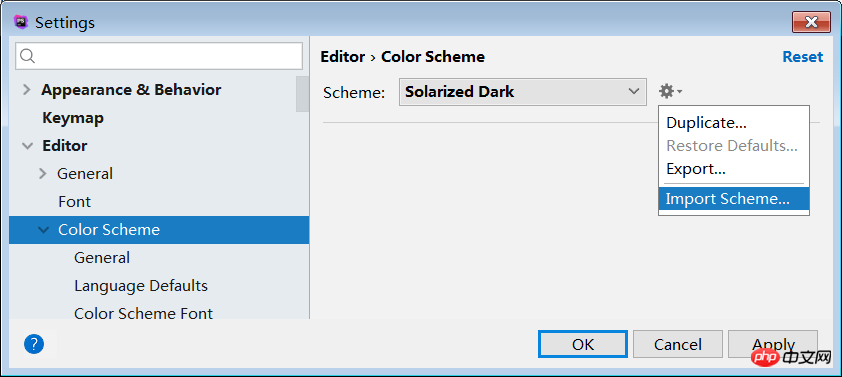
导入后,点击Apply按钮应用此主题。
四、设置字体大小
刚导入时,编辑器字体默认是11px,可以适当调大。
调整的位置是 Editor --> Color Scheme --> Color Scheme Font:
.png "1512743182476876.png")
注意:和PhpStrom自带的主题不同,此时在Editor --> Font 中调整字号是无效的。
五、效果预览
.png "1512743483276187.png")
配置好的sublime风格:
很赞哦! (0)
相关文章
- OneinStack脚本Let's Encpty SSL证书未能自动续约解决办法
- vscode运行yarn命令报错yarn : 无法加载文件 C:\Users\admin\AppData\Roaming\npm\yarn.ps1,因为在此系统上禁止运行脚本。
- Robots.txt文件的作用及定义方法
- Ckeditor编辑器添加的代码片段怎么在前台显示高亮效果
- Drupal7 Views模块
- OneinStack一键安装网站欢迎后配置使用Redis
- flashfxp v5.4 破解版
- oneinstack——SSL证书更新
- ckfinder实现图片上传后按当前日期重命名
- 关于python的深拷贝和浅拷贝